
Element X / Element Mobile: Where can I find my verification key?
-
Stuck at the account verification step in Element X Mobile?
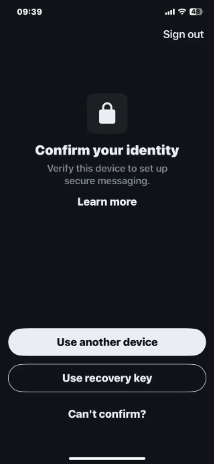
In previous versions, signing in with your GoFAST username and password was enough to access your conversations directly.
With Element X, you may be asked to provide a Recovery Key to verify your account and complete the sign-in process.
Here's how to easily find your Recovery key ( in GoFAST 4.5.6).
On your computer:
· Sign in to your GoFAST account.
· Open your user profile.
· Click the Account Settings icon.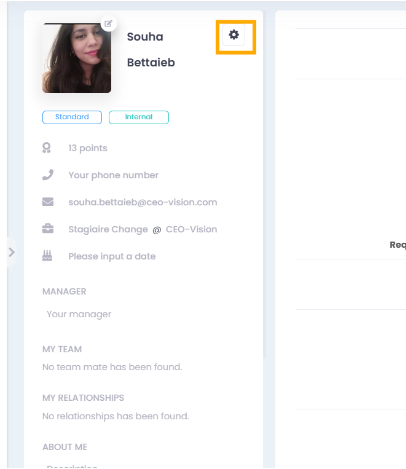
· Scroll down the page.
· In the Element Chat Settings section, locate your Recovery Key.
· Copy the Recovery Key.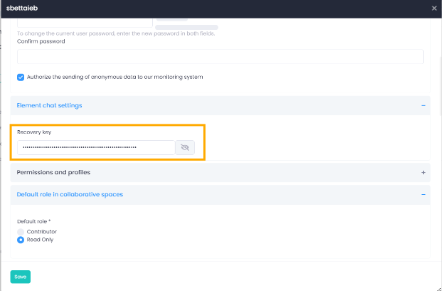
Enter the Recovery Key in the designated field on your mobile device
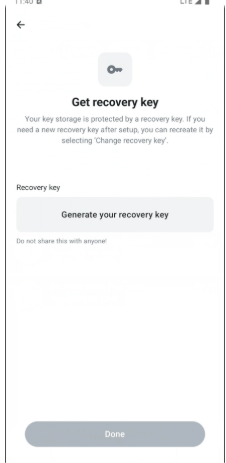
On your mobile device, sign in to GoFAST using your web browser. Open your profile from the left-hand menu, then go to Settings.
The rest of the procedure is the same as on a desktop computer.
We hope this helps. If you have any questions, please do not hesitate to contact us.
The CEO-Vision Team

Hello! It looks like you're interested in this conversation, but you don't have an account yet.
Getting fed up of having to scroll through the same posts each visit? When you register for an account, you'll always come back to exactly where you were before, and choose to be notified of new replies (either via email, or push notification). You'll also be able to save bookmarks and upvote posts to show your appreciation to other community members.
With your input, this post could be even better 💗
Register Login