Procédure Mise à jour GoFAST Community
-
Pour procéder à une Mise à jour de la plateforme GoFAST:
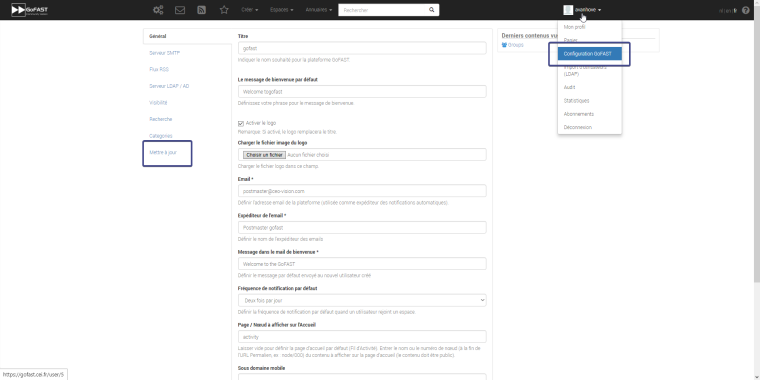
Aller dans l'onglet de votre profil et sélectionner "Configuration GoFAST" , une fois sur la page , dans la partie navigation il y a un onglet Mettre à jour.
Une fois sur la page il ne vous reste plus qu'à cliquer sur "Update" pour mettre à jour la plateforme.
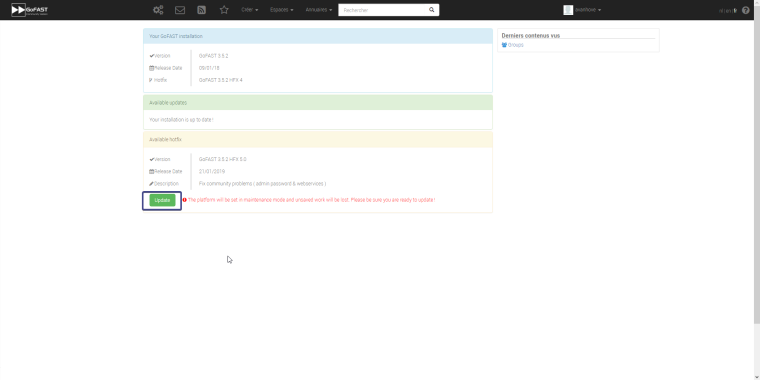
Cela peut prendre plus ou moins de temps selon la version de la GoFAST


Hello! It looks like you're interested in this conversation, but you don't have an account yet.
Getting fed up of having to scroll through the same posts each visit? When you register for an account, you'll always come back to exactly where you were before, and choose to be notified of new replies (either via email, or push notification). You'll also be able to save bookmarks and upvote posts to show your appreciation to other community members.
With your input, this post could be even better 💗
Register Login